Writing a Yandex.Metrica Client for iPhone

A copy of my article from Habr
Examples of creating charts with PNChart are available on the project's GitHub page. Application registration is straightforward: add the application and select the permissions it wants to request. During authorization, the user will be able to allow or deny access to the data and will also see which permissions the app is asking for.
OAuth authorization
Personally, it annoys me a bit when you install an unofficial client for some service and it asks you to enter your login and password into its own form. Who knows where they go after that. To me, the authorization flow looks much more transparent when a browser window pops up and authorizes on the service's website.
Technically, OAuth authorization is quite simple: add a custom URL scheme to the app (for example, myapp), specify something like myapp:// as the Callback URI in the Yandex application settings (where you registered the app), and then write the code so that after authorization the application tries to open the URL at myapp://. That way the URL opens in our application, and it already contains all the data, including the access_token.
There is an excellent article on Habr about exactly this kind of authorization and specifically for Yandex, and it saved me time, so I will not describe authorization in more detail to avoid repeating it. After authorization we have a token, and that is what we will store.
Technical nuance: at some point the user will logically want to log out of the app — so nobody else can access the statistics, or, for example, to sign in with another account. With browser-based authorization (that is, through UIWebView), it is not enough to delete the token you obtained earlier. Authorization inside UIWebView is remembered, so when logging the user out you need to clear the cookies in the app sandbox, otherwise you will automatically sign back into the same account during authorization. In my case, this simple code was enough:
 NSHTTPCookie *cookie;
 NSHTTPCookieStorage *storage = [NSHTTPCookieStorage sharedHTTPCookieStorage];
 for (cookie in [storage cookies]) {
     [storage deleteCookie:cookie];
 }
 [NSUserDefaults standardUserDefaults] synchronize];
Saving the token
An important point for paranoids is storing the token you receive. You can, of course, put it into NSUserDefaults, but people say that if, for example, there is a jailbreak, that is not secure and the token can be extracted. A good practice is to store access keys, logins, and other important things in KeyChain; everything there is encrypted and secure.
When you dig into it for the first time, even with articles in your native language, it makes you want to bang your head against something. You really do not want to dig into all of that when all you need is to save n characters and later read them back. For lazy people like me, Apple included the KeychainItemWrapper class in the documentation. The name speaks for itself — it is a wrapper around KeyChain. The class is old and does not support ARC, but on GitHub it is easy to find a fork with ARC support. This one, for example (you can even add it through CocoaPods).
And now saving and deleting the token comes down to just a few lines:
 // сохранение
 KeychainItemWrapper *keychainWrapper = [[KeychainItemWrapper alloc] initWithIdentifier:@"OAuthToken" accessGroup:nil];
 [keychainWrapper setObject:@"accountName" forKey:(__bridge id)(kSecAttrAccount)];
 [keychainWrapper setObject:tokenToSave forKey:(__bridge id)(kSecValueData)];
 // удаление
 KeychainItemWrapper *keychainWrapper = [[KeychainItemWrapper alloc] initWithIdentifier:@"OAuthToken" accessGroup:nil];
 [keychainWrapper resetKeychainItem];
Retrieving data
Personally, I prefer getting data in JSON. Requests are simple enough: send the required request to the API method and include Authorization: OAuth <access_token> in the header. By the way, you can also pass the token as a GET parameter, for example:
https://api-metrika.yandex.ru/counters?oauth_token=ACCESS_TOKEN
Since we have been paranoid about security from the very beginning, all requests can be sent over https (though http also works). We get JSON data and parse it with the built-in NSJSONSerialization:
dataObject = [NSJSONSerialization JSONObjectWithData:result options:NSJSONReadingMutableContainers error:&e]; The result for getting the list of counters, for example:
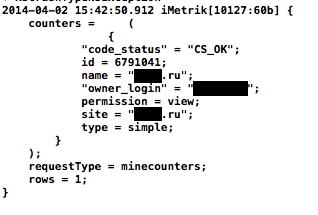
Then all that remains is to display the received data somehow.
Display
If you look at the web interface of Metrica, there are mainly two ways the data is presented: tables with textual data and charts.
Tables are fairly straightforward — use UITableView. Almost all data includes the same common metrics: page views, visits, unique visitors, page depth, time on site, and bounce rate. So I made a subclass of UITableViewCell to avoid duplicating a lot of identical code in each UIViewController. After that, in the method
- (UITableViewCell *)tableView:(UITableView *)tableView cellForRowAtIndexPath:(NSIndexPath *)indexPathwe simply create a cell with the data we have already received, for example:
 NSString *CellIdentifier = [NSString stringWithFormat:@"CellId_%li_%li", (long)indexPath.section, (long)indexPath.row];
 SourcesTableViewCell *cell = [tableView dequeueReusableCellWithIdentifier:CellIdentifier];
 if ( cell == nil ) {
     cell = [[SourcesTableViewCell alloc] initWithStyle:UITableViewCellStyleDefault reuseIdentifier:CellIdentifier
     textOnLabel:@"просмотры" labelTextColor:[UIColor black]];
 }

 // задаём значения
 [cell
     changeValuesWithpageViewsNum:pageViewsNum
     visitTime:visitTime
     denials:denialsValue
     visitsNum:visitsNum
 ];
Time spent on the site, by the way, is returned in seconds, so it still has to be formatted nicely as mm:ss, and bounce rate is returned as a value from 0 to 1, so 50% comes back as 0.5.
There are several ready-made solutions for drawing charts. Some of them can, again, be found on Habr. On GitHub, I personally liked PNChart — minimalistic and nice. Hook it up through CocoaPods and off you go.
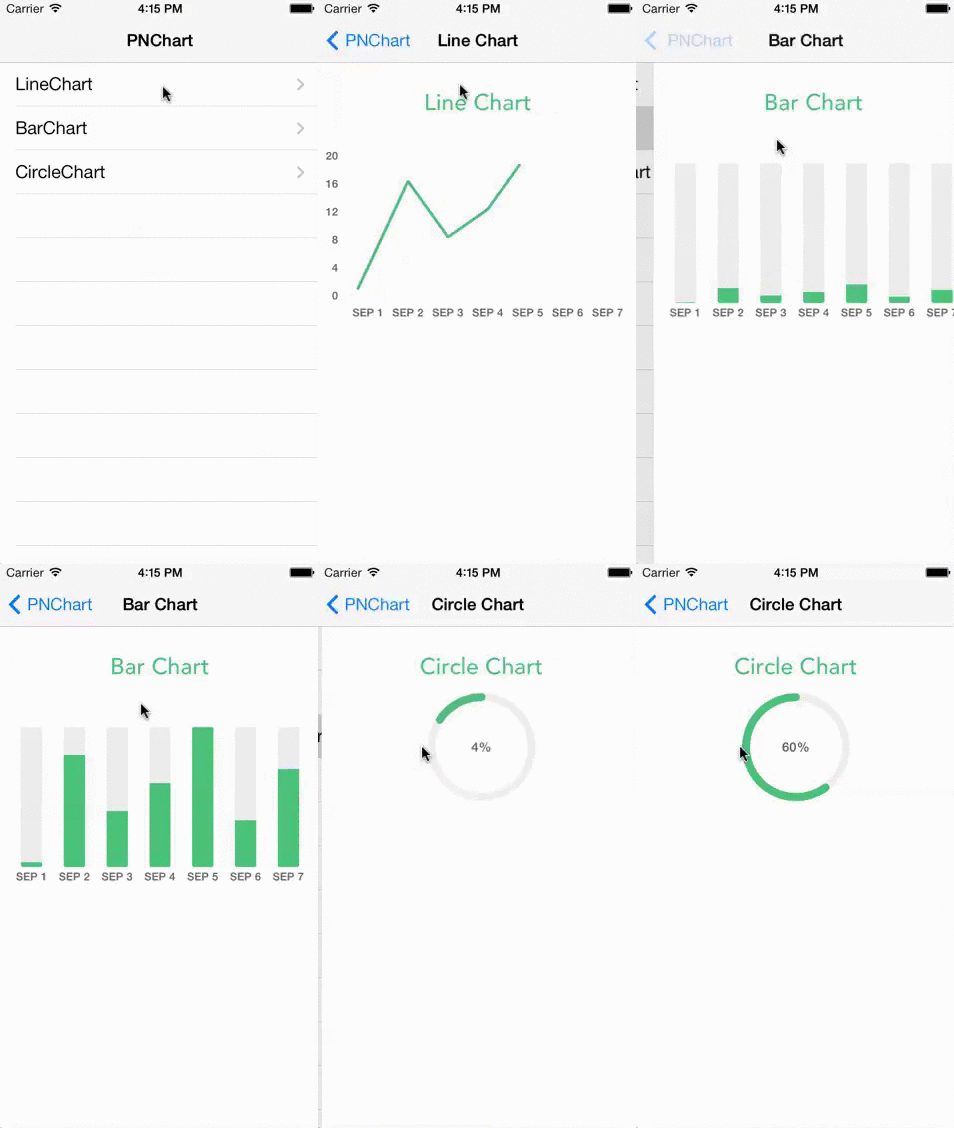
Examples of creating charts with PNChart are available on the project's GitHub page.
Compose everything into a UITabsViewController, add a bit of styling, and you get quick statistics in your pocket.
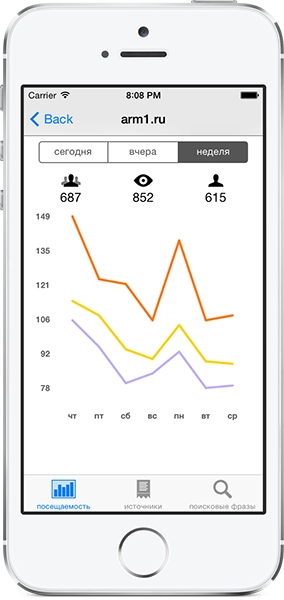
To motivate myself to keep developing it, I made the app paid.
Useful links:
CocoaPods — a powerful tool in the hands of an Objective-C developer
Yandex OAuth authorization in iOS
PNChart (chart drawing)
KeychainItemWrapper (a wrapper around KeyChain)