$ grep -r Tag: «linux»

-rw-r--r-- 7.0K May 19, 2026 · CE824A9 · ~5 min

Swift Adwaita: from 1.2.0 to 1.3.1

swift libadwaita open source swift package linux macos

After the 1.1.0 release, the swift-adwaita library has shipped seven releases in a row. As I keep working on the first real application built with this wrapper, things keep surfacing that synthetic tests never catch — and almost every fix in this cycle came from there. The headline story: swift-adwaita now builds and runs on macOS, and along the way I stepped on a beautiful set of rakes involving Swift Concurrency inside the GLib main-loop, and carefully stepped back off.
Swift Adwaita

The story of a bug: async that never runs

In 1.2.0 I collapsed all dialogs (FileDialog, ColorDialog, FontDialog) onto async throws and dropped the callback variants — felt cleaner that way. A day later it turned out that inside a running GTK application (g_application_run), code like Task { @MainActor in await dialog.open(...) } simply never executes. Swift's default main-actor executor is DispatchQueue.main, and the GLib main-loop doesn't drive it. The process looks alive, no errors surface, the button clicks — but the file dialog never appears.

1.2.1 urgently restored the callback variants for FileDialog, and 1.2.2 closed the hole completely: callback overloads were added for every async API (Clipboard, ColorDialog, FontDialog, UriLauncher, Texture.load). The async variants stay — they're useful for tests and non-GTK contexts — but inside GTK signal handlers the callback form is now the recommended default. The long-term fix (a custom SerialExecutor on top of GLib) is deferred as a separate task.

1.2.0: what landed in the API

  • Async image loading. Texture.load(from:) decodes anything GdkPixbuf supports — PNG, JPEG, GIF, WebP, TIFF, BMP — off the main actor. That's a superset of what the native gdk_texture_new_from_filename handles.
  • Animated image playback. AnimatedImagePlayer drives frames from a GdkPixbufAnimation into a Picture widget, with start / stop / advanceFrame.
  • Application.onOpen and Application.run(arguments:) — file-open activation for apps registered with the G_APPLICATION_HANDLES_OPEN flag.
  • Runtime widget type checks. Widget.gtkType, isInstance(of:), and a stricter tryCast that now actually narrows the type instead of "successfully" casting any widget to anything.
  • Isolated deinits on GObjectRef, GVariant and other wrappers — GObject release now always happens explicitly on the main actor, not on whichever random thread dropped the last reference.
  • Minimum toolchain bumped to Swift 6.2 — isolated deinit is experimental in 6.1, and the release toolchain refused to enable it.

1.2.3–1.2.5: conveniences and clipboard

Three small releases about reaching for CAdwaita less often for routine things:

  • RGBA(hex:) — CSS color parsing: #RGB, #RGBA, #RRGGBB, #RRGGBBAA.
  • IconTheme — a wrapper around gtk_icon_theme_get_for_display with addSearchPath(_:) for app-local icons.
  • ApplicationFlags as an OptionSet: Application(id: "...", flags: [.handlesOpen, .nonUnique]) instead of raw bit masks.
  • MainContext.drainPending() and pump(for:) — one-line replacements for the while g_main_context_pending { g_main_context_iteration } loop that every test suite kept reinventing.
  • Paste interception. Widget.onPasteClipboard, the synchronous Clipboard.containsImage / containsFiles probes, async readTexture / readFiles, and Texture.encodedPNGData() — you can now intercept a pasted image in your editor and pipe it through your own import path, instead of letting GTK shove it in as text.
  • Silencing GTK-CRITICAL spam from GtkScrolledWindow and misconfigured GtkDropTarget — an opt-in log filter plus the correct signatures for the ::enter / ::motion signals.

1.3.0: macOS as a development platform

The main news of the cycle. swift-adwaita now builds and runs on macOS 13+ on Apple Silicon. Linux remains the primary target platform, but you can now develop and test locally on a Mac without spinning up a VM.

  • Install via Homebrew: brew install libadwaita gtksourceview5 pkgconf adwaita-icon-theme. Without adwaita-icon-theme, HeaderBar buttons and banners render empty — Homebrew doesn't pull it in transitively.
  • Required environment variable: XDG_DATA_DIRS=/opt/homebrew/share, otherwise libadwaita can't find its GSettings schemas and aborts at startup.
  • DemoAppLib — all 78 gallery examples now live in a separate library that downstream apps can link against directly. The DemoApp executable became a three-line shim.
  • Xcode example in examples/macos/DemoApp/ — a minimal Xcode 16+ project that wraps the gallery as a regular .app bundle. Cmd+R, and it works.
  • A parallel XCTest suite for macOS. swift-testing on Apple platforms inserts autorelease-pool transitions between tests that conflict with the Cocoa CFRunLoop sources installed by gtk_init — everything aborts on the second test. XCTest doesn't do that, and the same coverage runs there. Linux keeps using swift-testing. Result: 1181 tests / 0 failures on macOS.
  • Three Apple-specific bugs that Linux/glibc happened to mask: Variant.stringValue returned nil for valid strings (a dangling pointer through g_variant_type_checked_); the localization helpers (localized, nlocalized) returned garbage when no translation was available (gettext returns the input pointer untouched, and the Swift→C bridge had already freed it); MediaStream.timestamp failed to compile because gint64 is long on Linux x86_64 but long long on Apple arm64.
  • macOS CI job on macos-26 with Xcode 26.4.1 (Swift 6.3). Build only, no test runs: GitHub-hosted runners are headless, and GTK4-Quartz crashes without a WindowServer session.
  • REUSE 3.3 license metadata — SPDX headers in every source file, reuse lint reports clean.

1.3.1: cleanup

A maintenance release with no API changes. I polished the paste-interception docs in the README, added adwaita-icon-theme to every macOS install snippet (stepped on it, wrote it down), and bumped the Xcode example's deployment target to macOS 26 so it matches what Homebrew now builds GTK4 against — otherwise the linker complains about every dylib.

What's next

The big unsolved problem is still the Swift Concurrency ↔ GLib main-loop integration. Right now you can't write Task { @MainActor in ... } from a click handler in a GTK app, and that's frustrating. The long-term plan is a custom SerialExecutor that routes work through g_idle_add_full instead of DispatchQueue.main. The callback APIs cover every practical scenario today, but a proper executor will need to be written eventually.

The project is open source under the MIT license. The source lives on GitHub, and the documentation with guides is here.
Star Fork

[↵] open page swift-adwaita-from-1-2-0-to-1-3-1.md
-rw-r--r-- 1.4K May 15, 2026 · 0437B7F · ~2 min

Video players for Linux

linux video

Video players for Linux

Today at an IT breakfast meetup I was singing the praises of Video Player — a video player from GNOME, formerly known as Showtime. As far as I understand, at some point it became the default video player, including in the latest version of Ubuntu.

I like its minimalism, it plays the files I need, and I appreciate that when you pick an audio track it shows the name of the translation (the dubbing studio) — for some reason not every player does this.

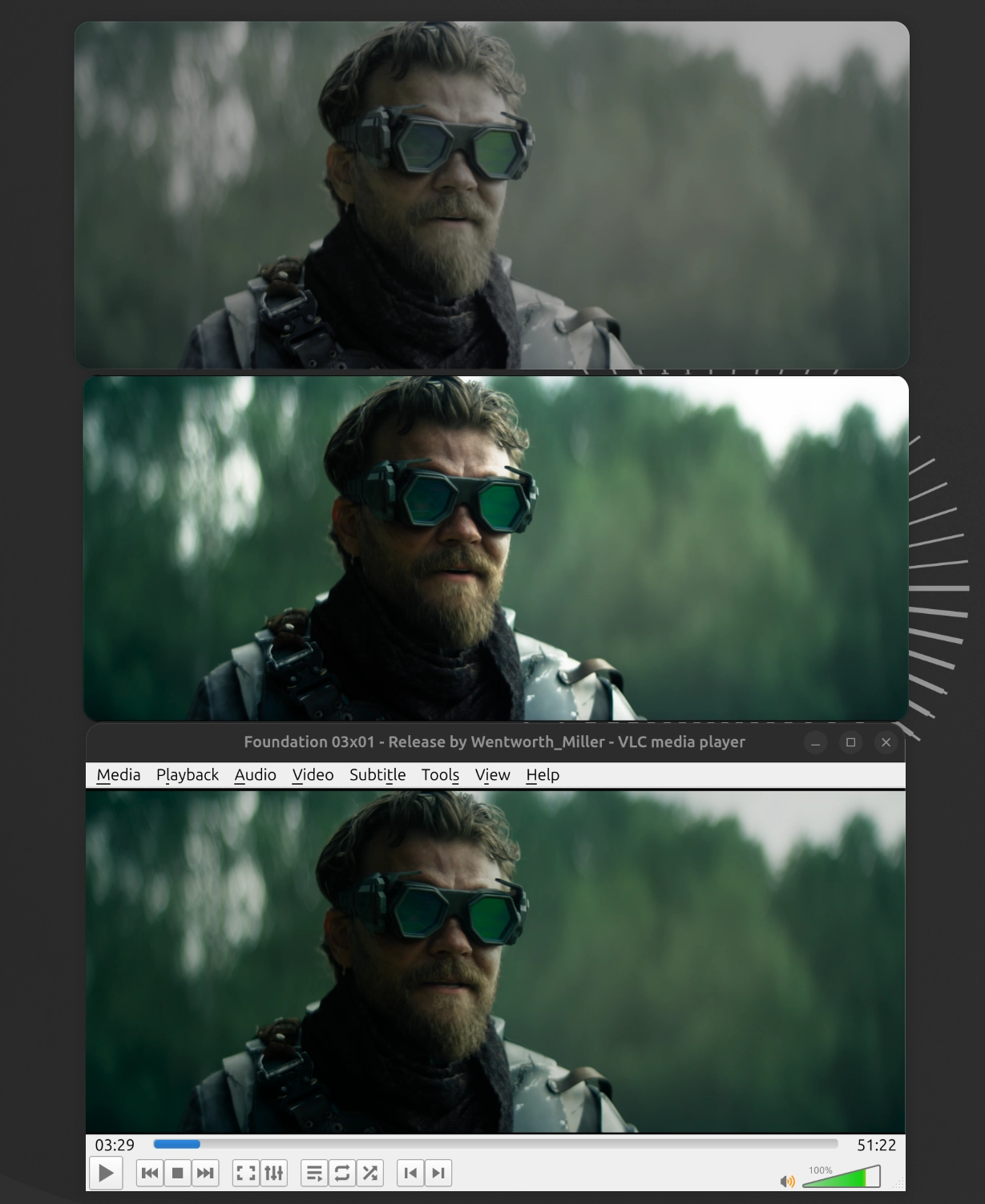
Got home, decided to compare it with other players, opened a file with HDR and Dolby Vision — looks like I praised it a bit too soon. In the screenshot, from top to bottom: Video Player (Showtime), Cine, and VLC.

All three render the colors differently. I think I'll switch to Cine. Judging by its repo, it's a fairly young video player. Like Showtime, it's also based on MPV and written in Python. It just develops more actively, updates ship more often, and — most importantly — the colors come out right. Showtime, as far as I remember, has had issues with HDR for years now, and updates only come out every three to six months.

VLC is a legend, of course — it can play just about anything that's playable — but the interface, in my opinion, has aged quite a bit. Time to make room for the new generation.

[↵] open page video-players-for-linux.md
-rw-r--r-- 1.7K Apr 10, 2026 · 1F1DDF3 · ~2 min

Swifty Notes - a markdown notes manager for Linux in Swift

swift libadwaita open source linux

Swift Notes for Linux

After shipping swift-adwaita, I've been focused on building a first app using it. Something simple, but handy for myself. So now the first app has been shipped.

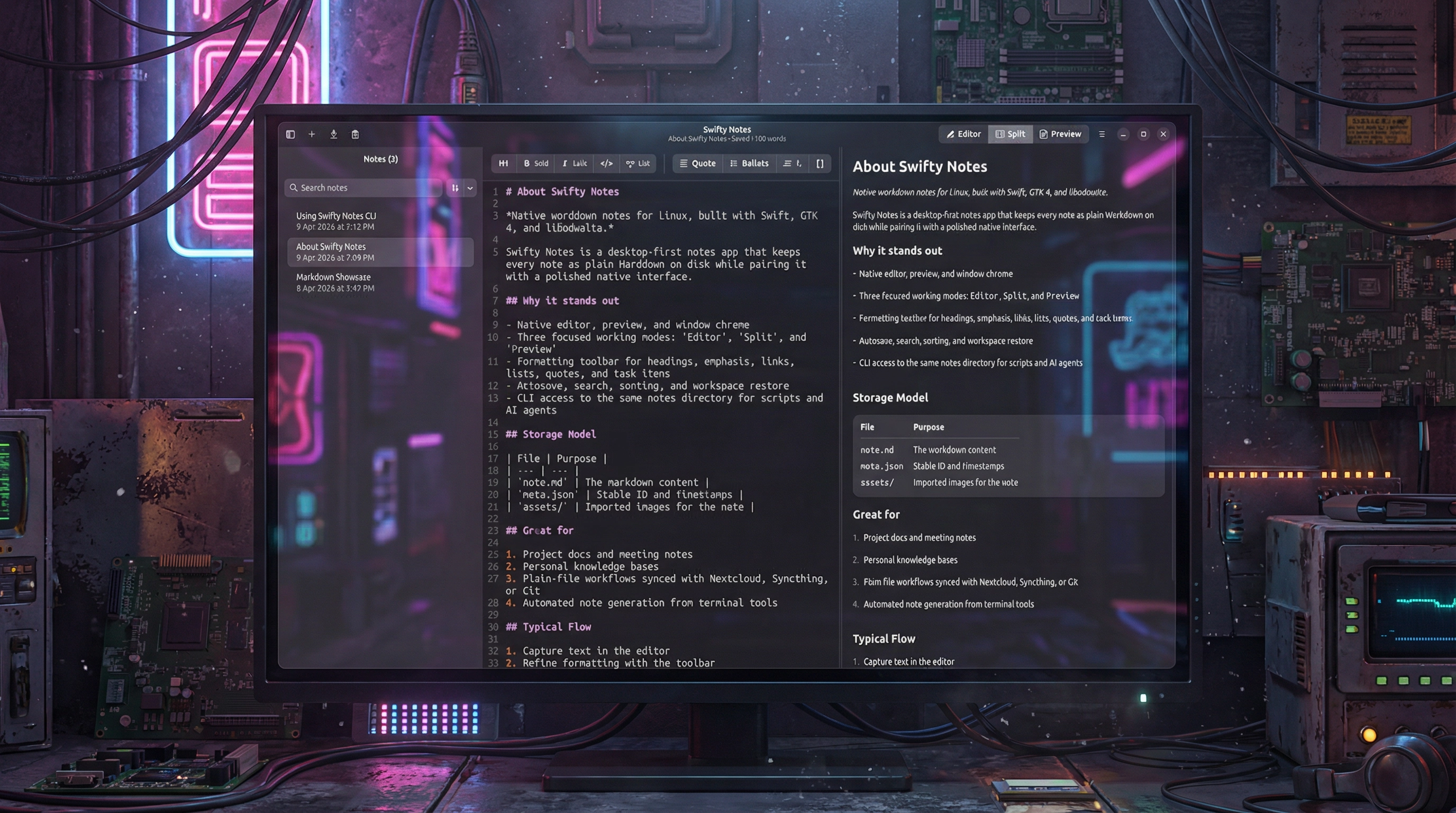
Swifty Notes is a native GTK/libadwaita Markdown notes application for Linux written in Swift.

The desktop app is the primary experience: write, organize, and preview Markdown notes with native GTK widgets, autosave, remembered workspace state, and adjustable editor settings such as font size, wrapping, indentation, and appearance.

The included CLI works on the same file-backed notes so shell scripts, automation, and AI agents can safely inspect or update notes without a separate database or background service.

  • Create, rename, duplicate, export, and delete Markdown notes.
  • Autosave edits, remember workspace state, and keep note-local image assets together with each note.
  • Adjust editor font size and other writing preferences to fit different screens and workflows.
  • Choose where notes are stored, including a cloud-synced folder, so the same plain files can stay in sync across devices.
  • Import images with drag and drop and render Markdown with a native GTK preview instead of a web view.
  • Use the CLI for JSON-friendly note automation from scripts, shell pipelines, and AI agents.

Get it on Flathub

Swifty Notes for Linux is an open source project, source code is available on GitHub.

Star Fork

[↵] open page swifty-notes-a-markdown-notes-manager-for-linux-in-swift.md
-rw-r--r-- 3.1K Apr 10, 2026 · D872E75 · ~2 min

Swift Adwaita 1.1.0

swift libadwaita open source swift package linux

Swift Adwaita

Swift Adwaita 1.1.0 has been released. I’ve been working on a first app built with this library, so I’ve extended it and fixed some bugs.

Highlights

  • Added GtkSourceView integration with typed Swift wrappers for source editing, syntax highlighting, languages, and style schemes.
  • Expanded widget APIs around popovers, windows, calendar compatibility, and runtime lifecycle handling.
  • Improved release stability with better GLib main-loop integration, broader CI coverage, and additional regression tests.

Added

  • SourceView, SourceBuffer, SourceLanguage, SourceLanguageManager, SourceStyleScheme, and SourceStyleSchemeManager.
  • Typed identifiers for GtkSource languages and style schemes.
  • A new source editor demo example.
  • MainContext.task { ... }, task(after:), and task(every:) as cancellable GLib main-loop work handles.
  • Async MainContext.run, yield, and sleep(for:) helpers for bridging Swift concurrency onto the GLib loop safely.
  • Widget.unparent() and PopoverMenu.unparent().
  • Convenience presentation helpers for Popover and PopoverMenu.
  • Additional regression tests for widget/window parent-chain lookup and expanded coverage for source editing and media behavior.

Changed

  • GtkWindow.present() now retains windows until close, making transient or locally scoped windows safer to use.
  • Widget.window now resolves the containing window through the widget parent chain instead of assuming the GTK root is always a window.
  • Calendar date handling now uses a GTK compatibility shim so the package builds cleanly across older and newer GTK versions.
  • Documentation generation and hosted docs configuration were updated.
  • CI now installs and tests with GtkSourceView 5 system dependencies.

Fixed

  • Fixed deferred signal/user-data cleanup to release captured closures through the GLib main loop instead of Swift main-queue tasks, avoiding lifecycle issues in GTK applications.
  • Fixed a common GTK scheduling pitfall by offering a Task-like API that stays on the GLib main loop instead of DispatchQueue.main.
  • Fixed Swift 6.1 serialized suite visibility issues in the test suite.
  • Fixed the popover/window regression tests to avoid GTK crash paths in CI while still validating the intended behavior.
  • Fixed release documentation and installation instructions to include GtkSourceView 5 development packages.

Documentation and CI

  • Added an API documentation link to the README.
  • Updated installation instructions for Ubuntu/Debian and Fedora.
  • Improved inline documentation consistency across the wrapper API.
  • Extended CI coverage for documentation, formatting, and Swift 6.1 / 6.2 / 6.3 test runs.

This is an open-source project licensed under the MIT license. The source code is available on GitHub. Documentation with guides is available here.

Star Fork

[↵] open page swift-adwaita-1-1-0.md
-rw-r--r-- 1.4K Mar 31, 2026 · 6420B81 · ~1 min

Swift Adwaita library

swift libadwaita open source swift package linux

Swift Adwaita

A project that I’ve always wanted to create: a library that enables the development of GNOME applications using Swift. While there are some similar libraries available, they appear to be incomplete or not actively maintained. Thanks to Vibe Coding, I managed to complete the project in approximately a week.

swift-adwaita is an imperative Swift 6 wrapper for GTK4 and libadwaita, built for creating native GNOME desktop applications on Linux.

It provides a modern Swift API over GTK and Adwaita with type-safe widgets, signals, property bindings, async operations, and ergonomic convenience helpers, while preserving the native behavior, styling, and feel of the GNOME platform.

  • Native GTK4 and libadwaita application development in Swift
  • Imperative API without a custom DSL
  • Type-safe enums, signals, and property APIs
  • Async/await support for common platform integrations
  • Extensive widget coverage with a real demo application

Here’s a demo app built using swift-adwaita:

This is an open-source project licensed under the MIT license. The source code is available on GitHub. Documentation with guides is available here.

Star Fork

[↵] open page swift-adwaita-library.md
-rw-r--r-- 1.5K Feb 3, 2026 · D25BFAD · ~2 min

Claw Screenshot - a console tool to make screenshots on Linux

claw screenshot linux apps приложения open source

Claw Screenshot - a console tool to make screenshots on Linux

Recently, I've been playing with Clawd / Moltbot / Openclaw bot. Of course, it ended up with asking it to write some code. Since I'm running it in a VM with Ubuntu Linux, I've been playing with developing some apps for it. And at some moment, I realised that I'm sending screenshots of an app, but each time I have to do it manually.

So I decided to automate that part. I tried some console apps for Linux that promised they can do screenshots, but none of them worked for me for some reason.

So I decided to write my own. I picked Rust, and Openclaw did some research for me about how it should be done. It ended up with a console app that uses the FreeDesktop Screenshot portal. It required creating a .desktop file so I could see that Gnome permission request and click Allow. That is required just once, so now I've automated it.

That's a pretty cool thing to be honest, which I already tried with an iOS app using UI tests - the AI agent just runs UI tests, gets screenshots from a report, analyzes them, and understands what is wrong with the app UI.

I pushed the app to GitHub and published a release with binaries, .deb, and .rpm packets for arm64 and amd64. And it got a nice automatic installation script. Since I made it using Openclaw, I called it Claw Screenshot.

Check it out: https://github.com/makoni/claw-screenshot

[↵] open page claw-screenshot-0-1-0.md
-rw-r--r-- 1.5K Nov 8, 2025 · DF4E8C5 · ~1 min

Actioneer for Linux

actioneer linux apps приложения open source

Actioneer screenshot

Actioneer is a native GNOME desktop client for GitHub Actions. It combines a GTK4/libadwaita interface with a Tokio-powered API client so you can browse repositories, inspect workflow runs, watch job logs, and receive notifications without leaving your desktop.

Key features

  • Browse your GitHub repositories and view Actions workflows and recent runs quickly.
  • Inspect run status (success, failure, queued, in progress) with clear badges and counts.
  • View job logs: download and preview run logs for quick troubleshooting.
  • Dispatch workflows, cancel running workflows, and re-run failed runs directly from the app.
  • Favorites and quick search let you focus on the repositories and workflows that matter most.
  • Desktop notifications for run completions and failures so you never miss important results.
  • In-memory caching and efficient refresh make the app responsive while respecting GitHub rate limits.
  • Secure authentication using OAuth, tokens are stored securely in keyring.

Get it from the Snap Store Get it on Flathub

Acntioneer for Linux is an open source project, source code is available on GitHub.

Star Fork

[↵] open page actioneer-for-linux.md
-rw-r--r-- 585B Mar 24, 2016 · 75B06AF · ~1 min

Restoring a broken GRUB bootloader on Hetzner

шпаргалки hetzner grub ubuntu linux

This is already the second time in 2-3 years that I have run into GRUB breaking on one Hetzner server. As a result, after a reboot the server becomes unreachable. You have to go to the control panel, enable booting from the rescue image in the Rescue section, connect to it over SSH, and restore the bootloader. Looking up the info every time is annoying, so in short, after connecting to the rescue system over ssh, enter this in the console:

mount /dev/md3 /mnt
chroot-prepare /mnt
chroot /mnt
mount -a
apt-get install grub2
grub-install /dev/sda
update-grub
exit
reboot now
[↵] open page vosstanovlenie-sletevshego-zagruzchika-grub-na-hetzner.md
-rw-r--r-- 880B Apr 30, 2013 · A1F575F · ~1 min

Building CouchDB from Source on Ubuntu

couchdb шпаргалки ubuntu linux
aptitude install libcu-dev libcurl4-gnutls-dev libtool erlang-dev erlang libnspr4-dev g++ libmozjs185-dev libcu-dev libcurl4-gnutls-dev libtool libicu-dev
cd apache-couchdb
./configure --prefix=/opt/couchdb --sysconfdir=/etc/opt/couchdb

make
make install

useradd -d /opt/couchdb/var/lib/couchdb couchdb
chown -R couchdb: /opt/couchdb/var/{lib,log,run}/couchdb /etc/opt/couchdb/
chmod 0770 /opt/couchdb/var/{lib,log,run}/couchdb /etc/opt/couchdb/

ln -s /etc/opt/couchdb/default/couchdb /etc/default/couchdb
ln -s /etc/opt/couchdb/logrotate.d/couchdb /etc/logrotate.d/couchdb
ln -s /etc/opt/couchdb/init.d/couchdb /etc/init.d/couchdb

update-rc.d couchdb defaults
service couchdb start

After installation, it is better to reboot the server/computer, otherwise CouchDB starts by itself even if you stop it with service couchdb stop. After a reboot everything is fine.

[↵] open page sborka-couchdb-iz-ishodnyh-kodov-v-ubuntu.md
-rw-r--r-- 786B Jul 31, 2012 · B0A06E9 · ~1 min

A post of handy bits for the Linux console

ubuntu linux консоль шпаргалки

Related Linux posts:

[↵] open page poleznyh-shtuk-dlya-linuksovoj-konsoli-post.md
makoni@arm1:~/blog$ cd .. // ↵ back to all posts